The Assessment for Estuarine Trophic Status (ASSETS) model can be applied by coastal managers, scientists and other interested parties. Please download the software from the link below. This site is being developed to include a registration area, which will allow you to upload data on your bay or estuary to the www.eutro.org website. This will be available in due course.
In mid-2015, The ASSETS software was rewritten for Windows 64 bit and 32 bit operating systems. The new version is presently available for download only in English, and has major enhancements, including geolocation and mapping capabilities, if you run the software while connected to the internet. Please note the following before downloading and installing:
1. All the disclaimers below apply to this version
2. Files saved with the previous ASSETS application will not be read by the new version. You will need to manually enter the data for your system in the new app, and then save with a new name (native format is now xlsx)
3. The new version runs on Windows 10, Windows 8, and Windows 7, for 64 bit and 32 bit platforms.
To install the App, use the link below to download the zip file. You will need to be logged on with administrator privileges on your computer. Expand the zipped file, preserving the folder structure, and run setup.exe
The ASSETS software has been developed by NOAA and FCT, and works only with the MS-Windows operating system. ASSETS is designed to make it easy for a user to enter data for a coastal system, and automatically perform an assessment of trophic status. There are four data entry screens:
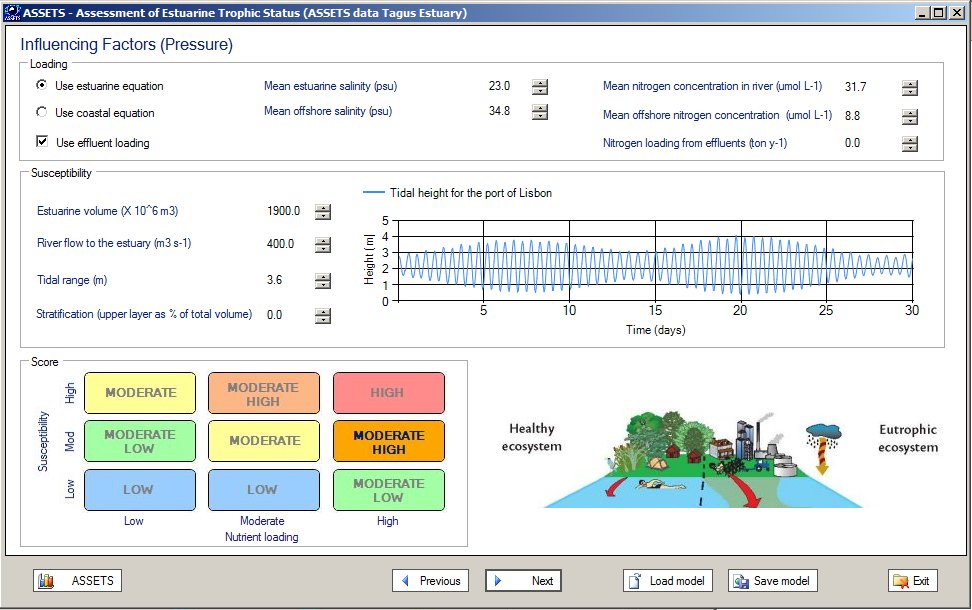
The data required for each component can be filled in any particular order, and saved at any time in order to be completed later. The figure below shows the screen for defining Pressure to the estuary, bay or coastal lagoon, known in ASSETS as Influencing Factors
NOAA and FCT have made every effort to ensure that the ASSETS software will perform appropriately. However, NOAA and FCT make no express or implied guarantees with respect to suitability of this software, and cannot accept any liability for its use. By clicking on the download link below, you acknowledge these terms of use.
Five versions of ASSETS are available, in English, Chinese, French, Spanish, and Portuguese. The authors are very grateful to Dr. Angel Borja for help with the Spanish version of the software, Dr. Camille Saurel for the French version, and Dr. Zhu Changbo for the Chinese version.The download link above is only for the English version. Please contact Dr. Suzanne Bricker at NOAA or Prof. Joao G. Ferreira at FCT.
You may redistribute the software free of charge, and are encouraged to do so. Resale is prohibited. If you find this software useful, or have any doubts or comments on application, you are welcome to contact Dr. Suzanne Bricker at NOAA or Prof. Joao G. Ferreira at FCT.
Copyright NOAA and FCT, 2008-2018, all rights reserved